
Run OpenRig on a remote server
A team of coding agents that keeps its seats when you log off.
Shelley handles the setup. About 15 minutes.
Prefer a terminal?
curl -fsSL https://exe-staging.dev/deploy/openrig/prompt.txt | ssh exe.dev new --prompt=/dev/stdinOpenRig turns coding agents into a team. You
describe the team in YAML (who builds, who reviews, who they report to),
and OpenRig starts each agent in its own tmux session, gives it a role
and an address like dev-build@pair, and lets the agents message each
other and keep a shared queue of work. It's built for projects that
last weeks, so it wants a computer that doesn't sleep.
This page gives it one: a VM with Claude Code and Codex already installed, connected to exe.dev's LLM integration with no API keys, and a two-agent team that starts again by itself after a reboot.
What you get#
- OpenRig 0.7.6 with its daemon and kernel (operator, advisor and queue worker), started by systemd.
- Claude Code and Codex connected to exe.dev's LLM integration, with no API key on the VM.
- A two-agent team in
~/project: a Claude Code builder and a Codex reviewer, each in its own tmux session. - Teams that were running come back after a reboot and resume their conversations.
What's running, and where
ssh my-openrig.exe.xyz
the OpenRig dashboard, every agent's terminal, and the rig CLI
Deploy with Shelley#
Click Deploy and Shelley will set up OpenRig on a new VM, then check that it works. No config-file wrangling required.
Prefer a terminal?
curl -fsSL \
  https://exe-staging.dev/deploy/openrig/prompt.txt \
  | ssh exe.dev new --prompt=/dev/stdin
What Shelley is told
Set up OpenRig on this VM by following the exe.dev recipe at https://exe-staging.dev/deploy/openrig.md from top to bottom.

The recipe's example VM name is my-openrig. This VM's name is the output of `hostname`: use it wherever the recipe writes my-openrig. Skip the step that creates the VM; you are on it.

You are done when all of these are true. Check each one yourself:
- OpenRig 0.7.6 with its daemon and kernel (operator, advisor and queue worker), started by systemd.
- Claude Code and Codex connected to exe.dev's LLM integration, with no API key on the VM.
- A two-agent team in `~/project`: a Claude Code builder and a Codex reviewer, each in its own tmux session.
- Teams that were running come back after a reboot and resume their conversations.

Read the whole recipe, including the closed details. For setup, follow
"Install by hand" only, skipping VM creation; the walkthrough above it is
for the owner. Do not run the restore, update or Pi instructions.
Install exactly @openrig/cli@0.7.6. Never attach to a tmux session; read
agents with `rig capture`. Do not send the team work, and do not run
`rig down`. Keep the VM private: never run share set-public or bind the
daemon beyond 127.0.0.1. On an existing VM, ask before replacing
~/.openrig, ~/rigs/pair or ~/project, or Claude Code or Codex settings
that aren't exe.dev's.
Verify: `rig doctor` reports no failures; openrig.service is enabled
and active; `rig status` says `Kernel: ready`; `rig ps --nodes --rig
pair` shows both seats `run`, each with a last observed model. Do not
reboot.
Finish with the two SSH commands from "Meet your team", using this VM's
name, and suggest the owner give the builder a first task.

Finish with the URLs I should open.
Also at /deploy/openrig/prompt.txt. The recipe it follows is /deploy/openrig.md.
Meet your team#
The team is called pair: a Claude Code builder, dev-build@pair, and a
Codex reviewer, dev-review@pair, both working in ~/project. On your
computer, open the dashboard:
ssh -t my-openrig.exe.xyz tmux attach -t operator-human@kernel
Pick pair in the explorer on the left with the arrow keys and Enter. Press Ctrl-b, then d to leave it running.
Now give the builder something to do, from a second terminal on your computer:
ssh my-openrig.exe.xyz rig send dev-build@pair \
  "'Write hello.sh that prints Hello from the rig, and a test for it. Ask dev-review to check it, then commit it on a branch.'"
The builder records the task in OpenRig's queue, writes it, and sends it to the reviewer. The dashboard shows both seats working and the queue filling in:
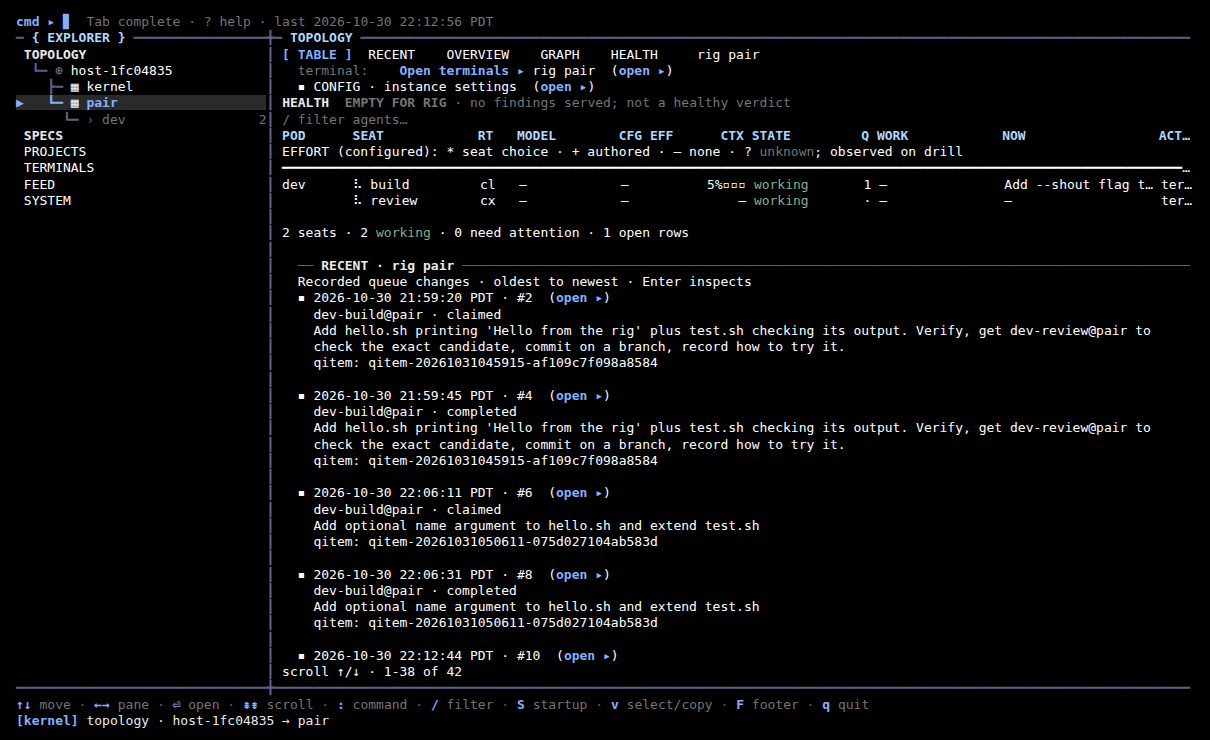
To watch or talk to one agent directly, attach to its session:
ssh -t my-openrig.exe.xyz tmux attach -t dev-build@pair
Type to it as you would in Claude Code. Detach with Ctrl-b, then d; closing your laptop doesn't stop it.
Ask the operator#
OpenRig's kernel comes with an operator, a Codex agent that knows
OpenRig. Ask it to explain a stuck seat, design a bigger team, or start
one of OpenRig's own (starter, factory, code-review, research):
ssh -t my-openrig.exe.xyz tmux attach -t operator-agent@kernel
Teams it starts from OpenRig's library ask before running some commands.
When one waits, rig ps --nodes -A shows which seat; attach to it and
answer.
Work on your own repository#
Connect a repository with the GitHub integration, so the agents can clone and push without a token on the VM. On your computer:
ssh exe.dev integrations add github --name app --repository you/app --attach vm:my-openrig
On the VM, clone it and give it a team of its own, named after it:
git clone https://github.int.exe.xyz/you/app.git ~/app
mkdir -p ~/rigs/app
sed -e 's/^name: pair/name: app/' -e 's|/home/exedev/project|/home/exedev/app|' \
  ~/rigs/pair/rig.yaml > ~/rigs/app/rig.yaml
printf '%s\n' /CLAUDE.md /AGENTS.md /.claude/ /.mcp.json /.openrig/ >> ~/app/.git/info/exclude
rig up ~/rigs/app/rig.yaml
The new seats are dev-build@app and dev-review@app. The exclude
line keeps the files OpenRig adds for its agents out of your commits.
Pushes appear as the exe.dev GitHub App unless the integration
acts as you.
Agents can open pull requests with gh once GH_HOST=github.int.exe.xyz
is set.
Add a Pi agent#
Pi seats keep their own settings, so give one the LLM integration first, then add it to the running team. On the VM:
d="$HOME/.openrig/state/pi/dev-scout@pair/agent"
mkdir -p "$d"
cat > "$d/models.json" <<'EOF'
{
  "providers": {
    "exe": {
      "baseUrl": "https://llm.int.exe.xyz/anthropic",
      "api": "anthropic-messages",
      "apiKey": "exe-llm-integration",
      "models": [{ "id": "claude-sonnet-5-5" }]
    }
  }
}
EOF
rig grow pair scout --runtime pi --cwd /home/exedev/project
rig ps --nodes --rig pair
The API key is a placeholder; exe.dev supplies the real credentials
outside the VM. After a minute, dev-scout@pair shows a last observed
model of exe/claude-sonnet-5-5.
Setup and upkeep#
No need to read on unless you're curious, or doing it yourself.
Install by hand
On your computer (pick another name if my-openrig is taken):
ssh exe.dev new --name=my-openrig
ssh my-openrig.exe.xyz
All remaining commands run on the VM, as exedev.
Install Node.js and OpenRig#
OpenRig needs Node.js 22 or 24. Install Node.js 24 from NodeSource, and
OpenRig into ~/.local, so updates need no sudo:
curl -fsSL https://deb.nodesource.com/setup_24.x | sudo -E bash -
sudo apt-get install -y nodejs
npm config set prefix ~/.local
npm install -g @openrig/cli@0.7.6
rig --version
Expect 0.7.6. npm warns that it skipped an install script; that's a
compatibility check, which rig doctor repeats below.
Connect Claude Code and Codex#
Point both at the LLM integration. OpenRig won't start Codex agents
unless codex login status says it's signed in, so give Codex a
placeholder key; the integration ignores it:
exeuntu configure claude
exeuntu configure codex
printf exe-llm-integration | codex login --with-api-key
claude -p "Reply with exactly: OK"
(cd /tmp && codex exec --skip-git-repo-check "Reply with exactly: OK")
Both should answer OK. On older VMs the first two commands are
exeuntu claude configure and exeuntu codex configure.
Prepare OpenRig#
rig setup checks both agents and adds mouse support and scrollback to
~/.tmux.conf. --no-herdr skips Herdr, a terminal workspace this
setup doesn't need, and --router-line no keeps an extra OpenRig line
out of your projects' CLAUDE.md and AGENTS.md:
rig setup --providers both --no-herdr --router-line no
rig doctor
The doctor should end with No failures in the checks above; a warning
that cmux isn't installed is fine.
Start OpenRig with the VM#
OpenRig starts its own daemon in the background. A systemd service runs
rig start --last at boot, which starts the daemon and the kernel and
brings back every team that was running, resuming their conversations.
It only starts and stops the daemon, so restarting it leaves the agents'
tmux sessions alone:
mkdir -p ~/.config/systemd/user
cat > ~/.config/systemd/user/openrig.service <<'EOF'
[Unit]
Description=OpenRig daemon, kernel, and the teams that were running
After=network-online.target
Wants=network-online.target

[Service]
Type=oneshot
RemainAfterExit=yes
Environment=PATH=%h/.local/bin:/usr/local/bin:/usr/bin:/bin
WorkingDirectory=%h
ExecStart=%h/.local/bin/rig start --last
ExecStop=%h/.local/bin/rig daemon stop
KillMode=process
TimeoutStartSec=5min

[Install]
WantedBy=default.target
EOF
sudo loginctl enable-linger "$USER"
systemctl --user daemon-reload
systemctl --user enable --now openrig
rig status
The first start takes a minute while the kernel's agents start. Expect
Daemon running on port 7433 and Kernel: ready. The daemon listens
on 127.0.0.1 only.
Start the team#
Make the project folder (skip the git init for a folder you already
have), and keep the files OpenRig adds for its agents out of git:
mkdir -p ~/project && cd ~/project
git rev-parse --git-dir >/dev/null 2>&1 || git init -b main
printf '%s\n' /CLAUDE.md /AGENTS.md /.claude/ /.mcp.json /.openrig/ >> .git/info/exclude
Describe the team. Its two agents come from OpenRig's library: an
implementer that builds and verifies, and a QA agent that checks the
exact change it's sent. The yolo policy lets them work without
permission prompts on this VM:
mkdir -p ~/rigs/pair
cat > ~/rigs/pair/rig.yaml <<'EOF'
version: "0.2"
name: pair
summary: A Claude Code builder and a Codex reviewer on their own exe.dev VM.
permission_policy: builtin:yolo
non_interruptive: true
pods:
  - id: dev
    label: Project
    members:
      - id: build
        agent_ref: "path:/home/exedev/.local/lib/node_modules/@openrig/cli/daemon/specs/agents/development/implementer"
        runtime: claude-code
        profile: default
        cwd: /home/exedev/project
      - id: review
        agent_ref: "path:/home/exedev/.local/lib/node_modules/@openrig/cli/daemon/specs/agents/development/qa"
        runtime: codex
        profile: default
        cwd: /home/exedev/project
    edges:
      - kind: delegates_to
        from: build
        to: review
edges: []
EOF
rig up ~/rigs/pair/rig.yaml
sleep 30
rig ps --nodes --rig pair
rig up reports Status: completed, then warnings that the seats run
with full bypass, as intended. Both seats should be run, with a last
observed model each (Claude for build, GPT for review).
Back up and restore
The code is the agents' work: push their branches. Everything else lives
on the VM: OpenRig's database and queue in ~/.openrig, the agents'
conversations in ~/.claude and ~/.codex, and the team files in
~/rigs. Copy the whole VM. On your computer:
ssh exe.dev cp my-openrig my-openrig-backup
The copy starts OpenRig and resumes the teams by itself, so use it
instead of the original, not beside it, or both teams work on the same
tasks. To keep a copy without running it, stop the copy's teams once
with ssh my-openrig-backup.exe.xyz 'rig down pair'.
Update
Read the changelog
first, and copy the VM as above. Then, on the VM, replacing 0.7.7 with
the version you want:
npm install -g @openrig/cli@0.7.7
systemctl --user restart openrig
rig --version
rig status
rig ps --nodes -A
The agents keep running through the restart; the new daemon picks them up.
Don't run rig down to update. For a big jump, ask Shelley to follow
OpenRig's
upgrade skill.
Something stuck?
Ask Shelley, or the operator. Or check on the VM:
rig status
rig ps --nodes -A
journalctl --user -u openrig -n 30 --no-pager
rig daemon logs | tail -n 40
rig doctor
- A seat shows
needs inputor attention. It's waiting at a prompt.rig capture <seat>shows it; attach withtmux attach -t <seat>and answer. If startup stopped there, run therig seat continue <seat>thatrig psshows. codex_authfails inrig doctor. Codex has no saved key: rerun thecodex login --with-api-keyline above.Readiness timeout after 30s. The agent started slowly. Runrig config set runtime.readiness_timeout_seconds 120, thenrig up pair --existing.- A team didn't come back after a reboot.
rig start --lastleaves down a team you stopped withrig down. Bring it back withrig up pair --existing. - No model reply. Run the two
OKchecks above and check your LLM integration. rig: command not found. Log in again, so~/.local/binis on your PATH.
Frequently asked questions#
What does it cost?
Your VM plan plus model usage, billed to your exe.dev account through the LLM integration. Agents waiting for work use no tokens, but every seat reads its instructions when it starts, and each task is paid for by the builder and the reviewer. The kernel's agents use tokens when you talk to the operator. The Claude Code seats use Claude Code's default model, which is Opus; type /model in a seat to pick a cheaper one.
Why do the agents run without asking permission?
The team file attaches OpenRig's builtin:yolo policy, so a team that works for days doesn't stall on a prompt while you're away. The VM is their sandbox: keep it private, and keep unrelated secrets and integrations off it. OpenRig's own kernel runs Codex with full access by default anyway. For prompts, change the policy to builtin:standard in ~/rigs/pair/rig.yaml, then start a new team with rig down pair and rig up ~/rigs/pair/rig.yaml.
Can I use my Claude or ChatGPT subscription instead?
ChatGPT, yes, without touching the VM: point the OpenAI provider of your LLM integration at your ChatGPT account. For a Claude subscription, remove the apiKeyHelper and env.ANTHROPIC_BASE_URL settings from ~/.claude/settings.json, run claude auth login on the VM, then restart the team as above.
Can my laptop's agent hand work to the team?
Yes. ssh my-openrig.exe.xyz rig send dev-build@pair "'your task'" works from any terminal or agent that can SSH to the VM (the inner quotes keep the task one argument on the VM), and ssh my-openrig.exe.xyz rig ps --nodes --rig pair shows what the team is doing.
Where does Shelley fit in?
Shelley, exe.dev's agent, runs on every VM, at https://my-openrig.shelley.exe.xyz/. It can read rig ps and rig capture, set up another team, or debug a stuck one while the team keeps working.
Updated Oct 31, 2026 · tested end to end Oct 31, 2026 · Markdown · manifest.json · Something wrong? Tell us